

Latest Version
KDE
Travel & Local
Linux
Free
org.kde.kwrite
Report a Problem
More About KWrite
When you need to jot down quick notes, edit configuration files, or write clean code without waiting for a heavy integrated development environment (IDE) to load, the KWrite text editor offers the perfect balance of speed and functionality.
What is the KWrite Text Editor?
Developed by the trusted KDE community, this Linux-based application serves as a highly efficient, lightweight utility built upon the robust editor component of Kate. It is designed specifically for users who require a responsive tool that doesn't compromise on essential developer features. Whether you are a casual system administrator or a dedicated programmer, it provides a streamlined environment to handle your daily plain-text and coding tasks.
Standout Features for Streamlined Editing
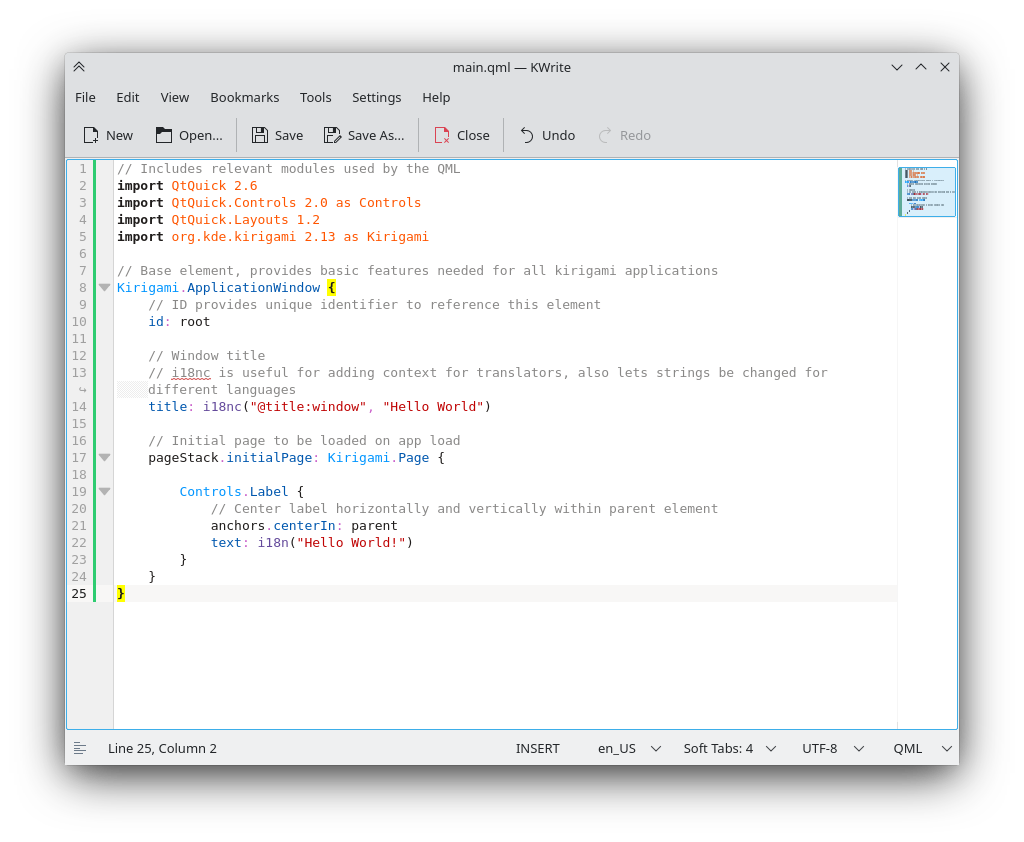
Despite its minimalist appearance, the KWrite text editor is packed with capabilities that elevate it far beyond a basic notepad substitute:
- Smart Syntax Highlighting: The editor automatically detects your file format, color-coding your code or markup to make readability and debugging effortless.
- Time-Saving Word Completion: Boost your typing efficiency with built-in word completion suggestions that help prevent typos.
- Auto-Indentation: Keep your scripts and source code perfectly structured without manual formatting hassle.
- Vi Input Mode: Power users can enable traditional Vi keybindings to navigate and edit text without lifting their hands from the keyboard.
- Extensible Plugin Support: Customize your workflow by enabling modular plugins that tailor the interface to your specific project needs.
Who is This Linux Utility For?
This software is an ideal match for Linux enthusiasts who appreciate clean, distraction-free workspaces. It bridges the gap between ultra-basic terminal editors and resource-heavy IDEs. If you want a fast-loading utility that respects your system resources while still offering robust code-friendly features, this application deserves a permanent spot in your desktop environment.
Get Started with KWrite
If you are ready to upgrade your text editing workflow on Linux, we highly recommend exploring this reliable tool. To check out the application, view user documentation, or grab the official package, head over to the official KWrite page on Flathub today.
Rate the App
User Reviews






Popular Apps










Editor's Choice